
P4+Mininet: 建立自定義Label Routing
P4+Mininet: 建立自定義Label Routing
本文將介紹如何在Mininet中使用P4實現自定義routing。此範例使用了p4-guide[1]中的Source Routing教學作為基礎進行修改並實作Label Routing。
VM建立
請從p4-guide教學用VM下載並以VirtualBox匯入.ova。筆者使用版本為P4 Tutorials Development 2025-10-01.ova,並以VirtualBox 7.1.2執行。
預設帳號:p4、密碼:p4
基礎操作
在~/tutorials/exercises/source_routing目錄下,可找到本次範例所需的P4程式碼及相關設定檔案。專案結構及topology如下:
~/tutorials/exercises/source_routing/
├── Makefile            # Compile及執行mininet
├── topology.json       # Mininet topology設定
├── source_routing.p4   # P4程式碼
├── s1-runtime.json     # switch1 runtime設定(flow table)
├── s2-runtime.json     # switch2 runtime設定
├── s3-runtime.json     # switch3 runtime設定
├── receive.py          # 接收端(監聽)程式碼
└── send.py             # 發送端程式碼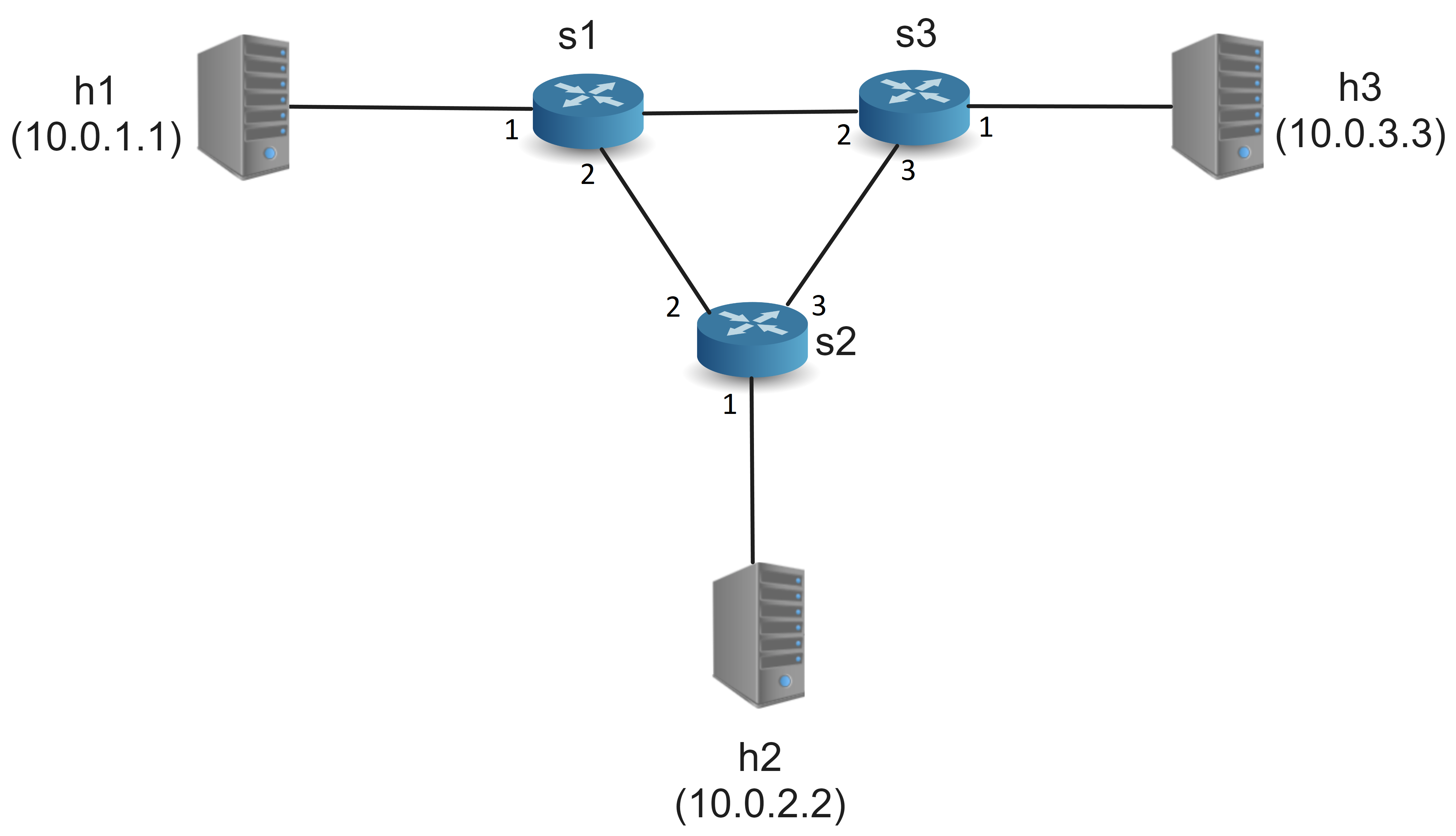
Tips
在專案目錄下執行make指令以編譯P4程式碼並啟動Mininet模擬器
自定義標籤路由(Label Routing)
本文範例使用 srcRoute_t 標頭中的 port 欄位作為 forwarding label,並執行兩個action:
- label_output:將封包依照label轉發到指定埠
- pop_label_output:移除
srcRoute_t標頭,並轉發到h2。
最後,在s1與s2上個別建立自定義flow table,讓帶有標籤「1」的封包能走h1->s1->s2->h2路徑。
P4程式碼說明
在source_routing.p4中,可進行自定義標頭、解析器(Parser)、match-action table及控制器(Control)等部分。以下為主要程式碼說明:
Parser
在
MyParserparser class中,新增解析srcRoutes標頭的state,並利用select語句根據bos(bottom of stack)欄位決定是否繼續解析下一個標籤或轉向IPv4標頭。parser MyParser(packet_in packet, out headers hdr, inout metadata meta, inout standard_metadata_t standard_metadata) { state start { transition parse_ethernet; } /* Select statement */ state parse_ethernet { packet.extract(hdr.ethernet); transition select(hdr.ethernet.etherType) { TYPE_SRCROUTING : parse_srcRouting; TYPE_IPV4 : parse_ipv4; default : accept; } } /* Parse the label stack */ state parse_srcRouting { packet.extract(hdr.srcRoutes.next); transition select(hdr.srcRoutes.last.bos) { 0 : parse_srcRouting; 1 : parse_ipv4; } } state parse_ipv4 { packet.extract(hdr.ipv4); transition accept; } }Ingress Processing
在
MyIngresscontrol class中,我們定義了對封包的處理邏輯,包括轉發、丟棄等行為。 其中:action label_output(egressSpec_t port)負責將封包轉發到指定埠。action pop_label_output(egressSpec_t port)與label_output相似,但最後會將乙太網路類型設為IPv4且移除Label。table label_routing根據srcRoutes[0].port欄位進行匹配,並執行相應的action。
control MyIngress(inout headers hdr,
                  inout metadata meta,
                  inout standard_metadata_t standard_metadata) {

    action drop() {
        mark_to_drop(standard_metadata);
    }

    /* 'label_output' action */
    action label_output(egressSpec_t port) {
        standard_metadata.egress_spec = port;
    }

    /* 'pop_label_output' action */
    action pop_label_output(egressSpec_t port) {
        standard_metadata.egress_spec = port;
        hdr.srcRoutes.pop_front(1);
        hdr.ethernet.etherType = TYPE_IPV4;
    }

    action update_ttl(){
        hdr.ipv4.ttl = hdr.ipv4.ttl - 1;
    }

    /* Table for label routing */
    table label_routing {
        key = {
            hdr.srcRoutes[0].port : exact;
        }
        actions = {
            label_output;
            pop_label_output;
            drop;
        }
        size = 64;
        default_action = drop;
    }

    /* Apply block logic */
    apply {
        if (hdr.srcRoutes[0].isValid()){
            label_routing.apply();
            if (hdr.ipv4.isValid()){
                update_ttl();
            }
        } else {
            drop();
        }
    }
}
Table Entry設定
在s1-runtime.json中,將剛剛建立的 label_routing table及 label_output action加入table_entries中,使Switch 1將標籤「1」的封包轉發到 port 2:
{
  "target": "bmv2",
  "p4info": "build/source_routing.p4.p4info.txtpb",
  "bmv2_json": "build/source_routing.json",
  "table_entries": [
    {
      "table": "MyIngress.label_routing",
      "match": {
        "hdr.srcRoutes[0].port": 1
      },
      "action_name": "MyIngress.label_output",
      "action_params": {
        "port": 2
      }
    }
  ]
}在s2-runtime.json中,使Switch 2將標籤「1」的封包轉發到 port 1,並且改使用 pop_label_output action 將標籤部分移除:
{
  "target": "bmv2",
  "p4info": "build/source_routing.p4.p4info.txtpb",
  "bmv2_json": "build/source_routing.json",
  "table_entries": [
    {
      "table": "MyIngress.label_routing",
      "match": {
        "hdr.srcRoutes[0].port": 1
      },
      "action_name": "MyIngress.pop_label_output",
      "action_params": {
        "port": 1
      }
    }
  ]
}
執行範例
在Mininet中,我們使用send.py程式從h1發送帶有標籤的封包到h2,並使用receive.py程式在h2監聽接收封包。
名稱修改
可將send.py及receive.py中的SourceRoute名稱全部改為LabelRoute以符合本文label routing功能。
*此更改僅會讓console輸出名稱更符合功能,並不會影響程式邏輯。
# class SourceRoute(Packet):
class LabelRoute(Packet): # 改名
   fields_desc = [ BitField("bos", 0, 1),
BitField("port", 0, 15)]# class SourceRoute(Packet):
class LabelRoute(Packet): # 改名
fields_desc = [ BitField("bos", 0, 1),
BitField("port", 0, 15)]
# class SourceRoutingTail(Packet):
class LabelRoutingTail(Packet): # 改名
fields_desc = [ XShortField("etherType", 0x800)]編譯並啟動Mininet,分別開啟
h1和h2的terminal:make # ...compile and start mininet mininet> xterm h1 h2在terminal中執行接收程式:
h2啟動接收端
python3 receive.pyh1啟動發送端
python3 send.py 10.0.0.2開啟後,輸入
1以將封包從h1按照我們定義的label routing轉發到h2,其packet應為如下 (注意[ ]內的port代表label):h1 -> s1,port1 {eth, [bos=1, port=1], ip} s1,port2 -> s2,port2 {eth, [bos=1, port=1], ip} s2,port1 -> h2 {eth, ip}
參考
Fingerhut, A. (n.d.). p4-guide: Guide to p4lang repositories and some other public info about P4. ↩︎